Our speaker talked about The Web Starter pack...this is the most basic CoffeeCup pack they offer, which allows people to create awesome websites without needing to do any coding!!! Its a good option for many people who are just getting started in web design. For people with more experience, the The Web Designer pack is the next level up...CoffeeCup also offers is the E-commerce pack, which has the shopping cart designer and other programs that are suitable to develop e-commerce websites.
Search Here!
Wednesday, November 10, 2010
Coffee Cup
Our speaker talked about The Web Starter pack...this is the most basic CoffeeCup pack they offer, which allows people to create awesome websites without needing to do any coding!!! Its a good option for many people who are just getting started in web design. For people with more experience, the The Web Designer pack is the next level up...CoffeeCup also offers is the E-commerce pack, which has the shopping cart designer and other programs that are suitable to develop e-commerce websites.
Wednesday, November 3, 2010
Web Usability
1- Efficiency: The structure of the site should be efficient...
2-Task Flow: the flow is important as a usable site has a page flow that must match with the workflow.
3-Replication: It's ok to use templates!
4-Testing for usability: Testing early is very important within the design stage. A designer should not wait till the end to do this. HTML, Javascript should be tested for compatibility.
5-Motivation: The design for the website should meet the specific needs of the user. The design should motivate different types of users to specific parts of the site.
6-Track the traffic: Keep track of which page gets hit the most. Which page do people spend less time and click right onto the next page immediately? The site can be adjusted accordingly.
Webform Podcast
Wednesday, October 20, 2010
Visually Impaired and Web Accessibility
A large percent of Internet surfers are visually impaired. These individuals can be blind, colour blind or not have the vision they once had. It is very important for their needs to be recognized as well.
Macintosh Accessibility for the Visually Impaired
Wednesday, September 29, 2010
Use of Color on the Web

Some key questions to keep in mind while trying to choose the right colors could be:
· Who are your site’s potential visitors?
· What are your products or services?
· What are your site’s key objectives?
Text and background color selections do also affect readability, which can be an issue for visitors who are older those with visual impairments.
Check this site out for some great online color tools : http://bluefaqs.com/2009/11/25-online-color-tools-for-designers/
Thursday, September 9, 2010

Sites built to Web Standards
The term web standards can mean diverse things to different people. For some, it is ‘table-free sites‘, for others it is ‘using valid code‘. However, web standards are much broader than that. A site built to web standards should adhere to standards (HTML, XHTML, XML, CSS, XSLT, DOM, MathML, SVG etc) andpursue best practices (valid code, accessible code, semantically correct code, user-friendly URLs etc).
In other words, a site built to web standards should ideally be lean, clean, CSS-based, accessible, usable and search engine friendly.
http://www.maxdesign.com.au/articles/checklist/
Why do web standards matter?
There are numerous advantages to using web standards. Here are some highlights:
• Save $$$ (ease of maintenance): It is quick and easy to change unformatted content in HTML files which indicates that site changes take less time and eventually less money.
• Up to 60% Less Code! : Many websites that are built around Web Standards use up to 60% less code.
• Improved Search Engine Rankings
• Changing the layout is easier: When the site is designed with web standards in mind, site-wide changes become a lot easier. If a different color is needed for the site, all that needs to be done is to change one line of code in CSS. If you want your website to look good on mobile devices all that needs to be done is use CSS and your website will look good on mobile devices . Designing with web standards will give many more options to select from and will allow for swift and effortless site-wide changes.
• Accessibility: Vision impaired surfers may be using special web browsers. Using web standards makes it much easier to make content useable under special circumstance and also to the search engines.
Thursday, September 2, 2010
What is Information Architecture?
For instance, a well architected website selling Caribbean cruises would branch into sub-topics (sub-directories and/or sub-menus) that flesh out the main theme. These sub-areas of the site might focus on specific Caribbean ports of call, cruise lines, specials / deals, thematic cruises, local culture, and anything else relevant to Caribbean cruises.
(Information above was located at http://www.ozonesem.com/search-engine-optimization/website-structure.html)

I have always wanted to know more about how the domain structure for multilingual sites are. Upon visiting some good sites, I figured that there are many ways to handle sites that are created in different languages for these countries. It looks like the best method however, is to create country specific TLDs with unique sites and content. Localization is critical and ensure that for instance the Spain site has language specific to Spain, not Chile! Another comparable method is to create sub-domains for each language version. Another not quite desirable, is to create a directory structure that serves each language. In all cases, web writers need to make sure of the name of the directories that use the language of the country being served.
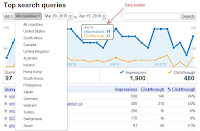
Thankfully, Google Webmaster Tools now permit us to indicate the language preference for directories and sub-domains.
The first method, of course, has many benefits, which include the ability to validate the domain in Google Webmaster Tools and specify the geographic location. International TLDs will be indexed and listed in specific language versions of search engines and regional directories, while many sub-domains and directory localization strategies will not be indexed and listed such.
Small international sites should be served with a version selector for each country-specific domain. This assists with spidering and allows users to choose the version of the site they are interested in using.
